 Tellofy Support
You can navigate to this screen by choosing the Tellofy AI -> Data Sync -> Instance Management menu option.
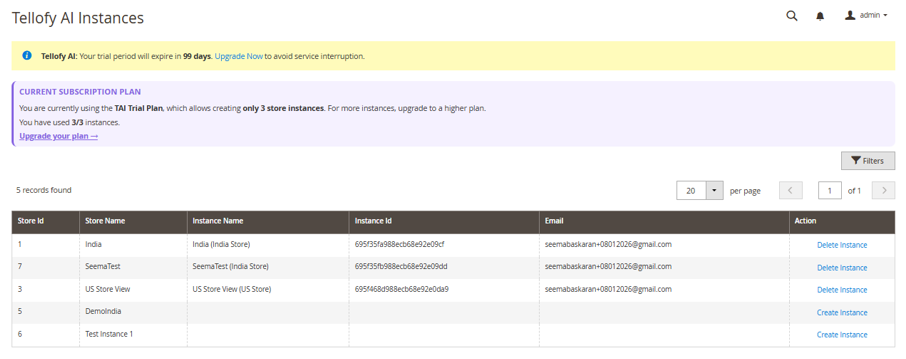
This screen will allow you to create or delete store view instances from Tellofy AI. On this screen, the following elements will be displayed:
Current Subscription Plan: Details of your subscription plan will be shown here. The details would be include the name of your plan and the number of instances allowed and the number of instances that you have already used. You will have the option to upgrade your plan. To do so, click on the Upgrade your plan link. Note: the link will open corresponding screen on Tellofy AI dashboard (you would need to login).
Stores: All store views that are available will be listed. Stores for which Tellofy AI instances has been created will have the corresponding instance name and Id listed. You will have the option to delete such instances from TAI. Do note that when you delete, the instance (and its data – products, categories and pages) will get deleted from Tellofy. The store view will remain and only the instance/data that was synced would get deleted. To delete, click on the Delete Instance link. Once you confirm the action, the instance would get deleted.
Store views for which a Tellofy AI instance is not available will have a link to create an instance for it. Clicking on the link will cause the instance to be created. Do note, that the number of instances that you can create would be based on your Tellofy AI subscription plan.